IVR done right: routing customers actually like
“Press 1 for sales. Press 2 for support. Press 3 for billing. Press 4 to hear these options again.”
Most people have been stuck in a phone menu that seemed designed to keep them away from a human. That experience gives IVR (interactive voice response) a bad name. Done well, it does the opposite: it gets callers to the right person faster than any receptionist could.
What a good IVR should do
A good IVR has one job: get each caller to the person or answer they need, as quickly as possible. Everything else is secondary. If a menu adds time without improving where the call ends up, it is in the way.
Seven rules for IVR customers actually like
1. Keep the first menu short. Three or four options is plenty. More than that and callers forget the first option before they hear the last.
2. Put the most common reason first. Look at why people actually call. If most callers want to check an order, that should be option 1, not option 4.
3. Use your customers’ words. “Track my delivery” is clearer than “logistics enquiries.” Name options the way customers describe their problem.
4. Always offer a way to reach a person. Give callers a clear option to speak to someone, and say it early.
5. Go no more than two levels deep. Every extra menu layer increases drop-offs. If you need more, your first menu is probably doing too much.
6. Respect business hours. Outside working hours, say so clearly, give the hours, and offer voicemail or an alternative channel such as WhatsApp.
7. Offer your main languages. Where your customers speak different languages, let them choose at the start and route them to agents who can help.
Example menus you can copy
A retail or e-commerce business
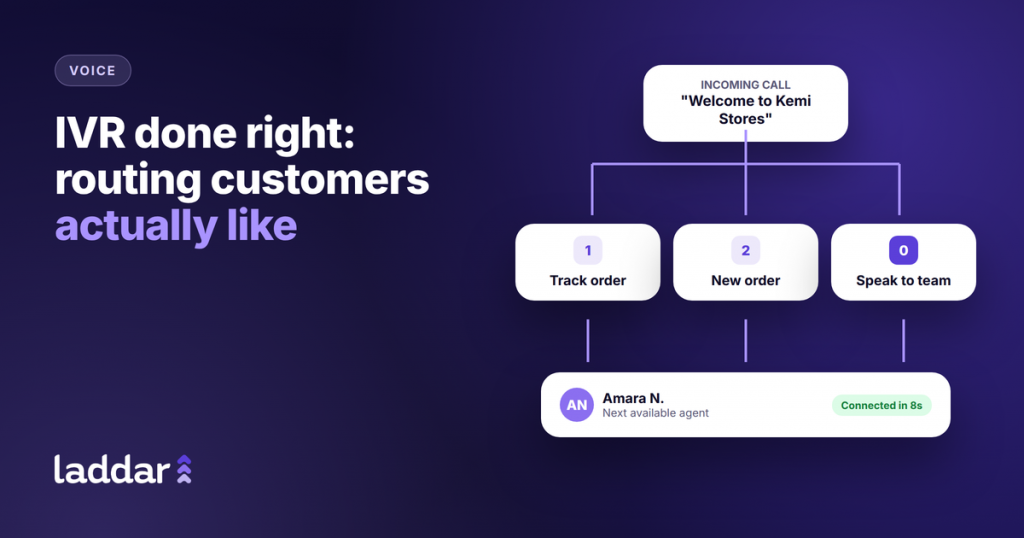
“Welcome to [Business]. To track an order, press 1. To place a new order, press 2. For returns or complaints, press 3. To speak to our team, press 0.”
A financial services provider
“Thank you for calling [Business]. For account opening, press 1. For loan enquiries, press 2. To report a problem with a transaction, press 3. To speak with an agent, press 0.”
After hours
“Thank you for calling [Business]. Our team is available Monday to Friday, 8am to 6pm. Please leave a message after the tone and we will call you back on the next working day.”
Routing behind the menu matters too
The menu is only half the experience. What happens after a caller presses a button decides whether the call is resolved.
- Route by group, skill or language so calls reach agents who can actually help.
- Use configurable ringing so calls go to the next available agent instead of ringing one phone until it drops.
- Allow smooth transfers so callers do not need to repeat themselves.
- Review recordings and call data to find where callers drop off and fix those steps.
Keep improving it
An IVR is never finished. Review it every few months: which options are used most, where calls are abandoned and what callers ask for that the menu does not cover. Small changes, like reordering options or rewording one prompt, can make a noticeable difference.
How Laddar Voice helps
Laddar Voice includes IVR and call routing as part of its Call Center Solution, with agent management to route calls by group, department, skill or language, configurable ringing, transfers, recordings and call analytics, so you can set up menus quickly and keep improving them.
The bottom line
Great IVR is short, clear and built around why customers call. Keep menus simple, always offer a person, route calls to the right agent and keep refining based on real call data.
Set up IVR your customers will thank you for.